Read the review addition at the end of the article
Finally, our editorial team received the Beelink GT-King. We will try to provide a detailed overview of the new console, its capabilities, advantages, and disadvantages, as well as try to determine whether it is worth buying.
Let’s start with the technical specifications.
Technical specifications
| CPU | CPU S922X Quad core ARM Cortex-A73 and dual core ARM Cortex-A53 |
| Instruction Set 32bit | |
| Lithography 12nm | |
| Frequency 1.8GHz | |
| RAM | LPDDR4 4GB 2800MHz |
| ROM | 3D EMMC 64G |
| GPU | ARM MaliTM-G52MP6(6EE) GPU |
| Graphics Frequency 800MHz | |
| Displays Supported x HDMI,1 x CVBS | |
| Audio | Built-in DAC x1 L/R ,x1 MIC |
| Ethernet | RTL8211F x1 10/100/1000M LAN |
| Bluetooth | Bluetooth 4.1 |
| WIFI | MIMO 2T2R 802.11 a/b/g/n/ac 2.4G 5.8G |
| Interfaces | DC JACK x1 12V 1.5A |
| x1 USB2.0 Port ,x2 USB3.0 Ports | |
| x1 HDMI 2.1 Type-A | |
| x1 RJ45 | |
| SPDIF x1 Optical | |
| AV x1 CVBS, L/R | |
| x1 TF card Seat | |
| x1 PDM MIC | |
| x1 Infrared receiver | |
| x1 Upgrade Button | |
| OS | Android 9.1 |
| Power | Adapter Input: 100-240V~50/60Hz , Output: 12V 1.5A, 18W |
| Size | 108х108х17 |
| Weight | 189 grams |
Supported formats and hardware decoding resolutions
Support multi-video decoder up to 4Kx2K@60fps+1x1080P@60fps
Supports multiple “secured” video decoding sessions and simultaneous decoding and encoding
H.265/HEVC Main/Main10 profile @ level 5.1 High-tier; up to 4Kx2K @ 60fps
VP9 Profile-2 up to 4Kx2K@60fps
H.265 HEVC MP-10@L5.1 up to 4Kx2K@60fps
AVS2-P2 Profile up to 4Kx2K@60fps
H.264 AVC HP@L5.1 up to 4Kx2K@30fps
H.264 MVC up to 1080P@60fps
MPEG-4 ASP@L5 up to 1080P@60fps (ISO-14496)
WMV/VC-1 SP/MP/AP up to 1080P@60fps
AVS-P16(AVS+) /AVS-P2 JiZhun Profile up to 1080P@60fps
MPEG-2 MP/HL up to 1080P@60fps (ISO-13818)
MPEG-1 MP/HL up to 1080P@60fps (ISO-11172)
RealVideo 8/9/10 up to 1080P@60fps
Packaging and contents
Beelink GT-King is packaged quite simply; all components are in one box, unlike, for example, the Beelink GT1 Mini and the predecessor Beelink GT1 Ultimate, where all components were packed in separate boxes. The remote control is packed in a plastic bag, the HDMI cable is rolled up with a branded strap, as well as the power cord.
The package includes:
- Beelink GT-King console
- HDMI cable
- Power supply
- Remote control (USB adapter hidden inside the remote)
- Brief instructions (includes Russian language)
- Support contact card
Regarding the remote control: it operates on 2 AAA batteries (not included), connects to the console via a wireless USB adapter. All remote buttons, except the power button, only work when the USB adapter is connected. The power button works via IR receiver.
The remote has a built-in gyroscope and a button for voice search. The voice search button from the box only launches Google Assistant. For setting up voice search within installed apps, some time and internal configuration of the console are required.
All buttons on the remote work correctly; the power button can be configured for different modes, such as turning off, sleep mode, reboot.
Appearance
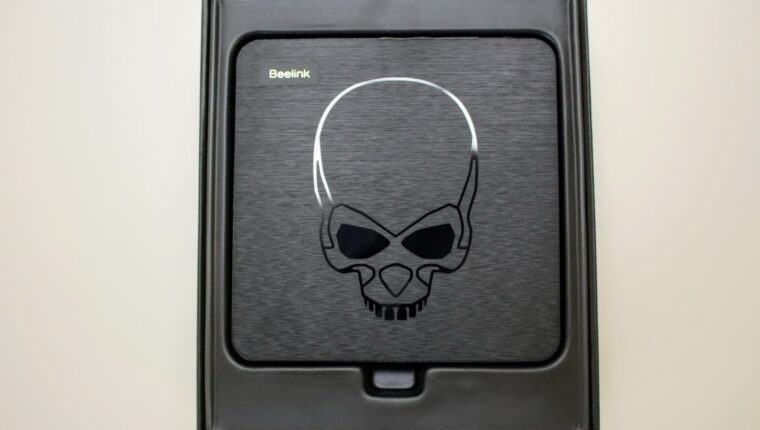
The Beelink GT-King has received some design updates; firstly, it has become larger, likely due to the presence of a top-tier processor and the absence of active cooling. Secondly, a skull engraving with glowing eyes appeared on the case; when turned on, the eyes glow green, purely decorative backlighting.
On the front, there is a built-in microphone hole for voice search. On the left edge, there are 2 USB 3.0 ports and a memory card slot. On the rear edge, there are the power connector, HDMI 2.1 port, USB 2.0 port, SPDIF port, and AV port.
There are no ports on the right edge.
On the bottom of the Beelink GT-King, there is a serial number label and a hole for entering update mode.
Startup and interface
When first turned on, the Beelink GT-King runs the initial setup wizard, where you select language, time zone, etc.
Despite the updated Android 9 version, the interface of the console has not changed; the launcher and home screen look the same.
Settings of the Beelink GT-King
The firmware version installed on our device provides access to the following settings:
Display – screen settings
- Screen resolution – resolution parameters
- Auto switch to best resolution – automatic resolution adjustment
- Display Mode (from 480p 60 Hz to 4K 2K 60Hz) – manual resolution selection
- Color Depth Settings – color depth settings
- Color Space Settings – color space settings
- Screen position – screen scaling settings
- HDR to SDR – automatic HDR to SDR conversion (recommended when connecting to a non-HDR TV)
- SDR to HDR – automatic SDR to HDR conversion (recommended when connecting to an HDR-supported TV)
HDMI CEC – TV remote control settings (supported mainly on recent SMART TVs, but works well with those that support this standard)
Audio Output – sound output parameters, can be set to HDMI or SPDIF
Powerkey definition – set the action for the power button on the remote, options include: shutdown, sleep mode, reboot.
More settings – opens the full device settings list
Voice search on Beelink GT-King
The console has voice search, but unfortunately, it does not work inside installed apps. Pressing the microphone button on the remote launches Google Assistant. To set up voice search within installed apps, some time and internal configuration are required.
Testing
As usual, we start with an Antutu benchmark; the Beelink GT-King scored over 105,000 points.
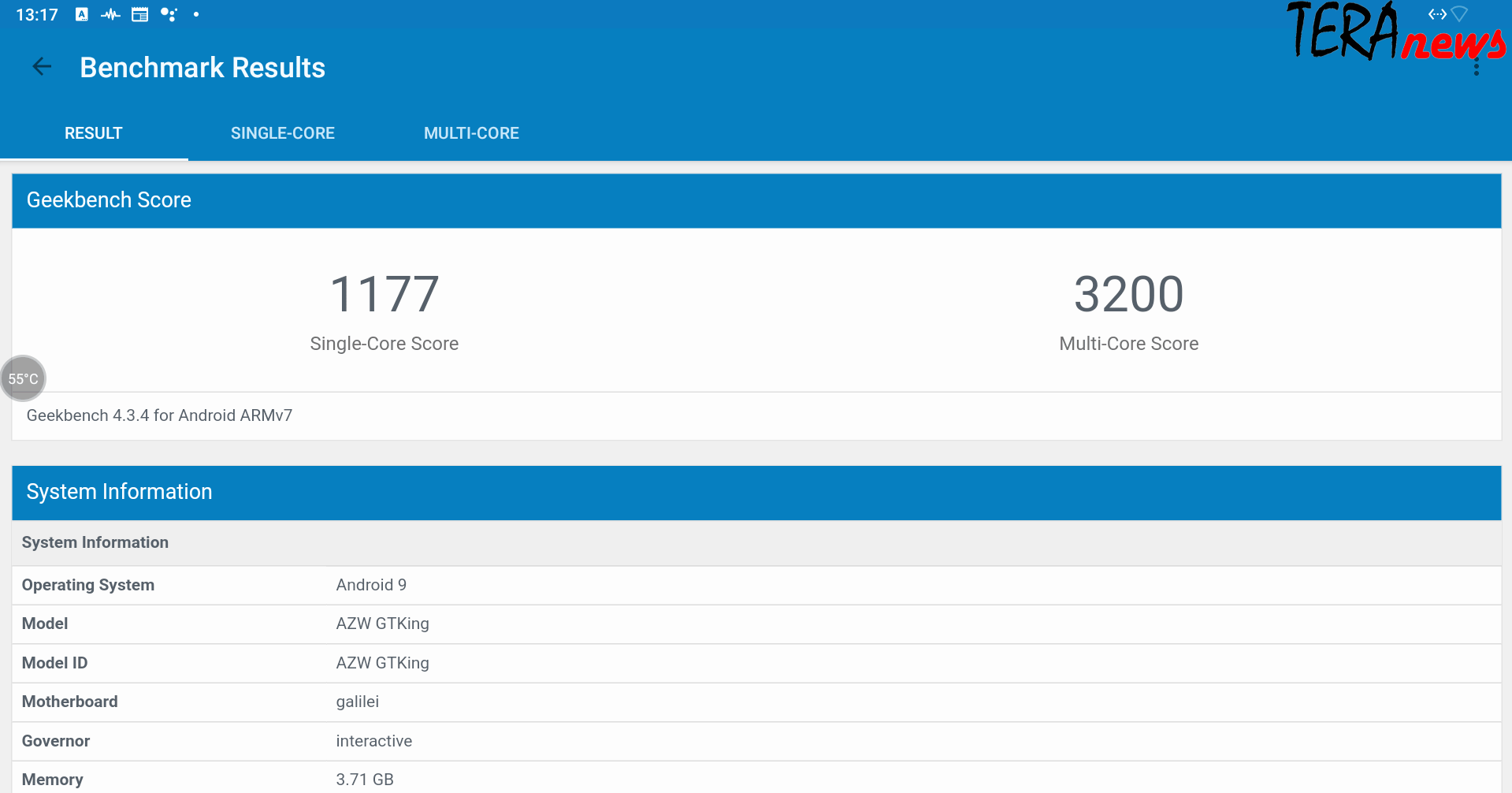
Next, Geekbench 4 test
3DMARK
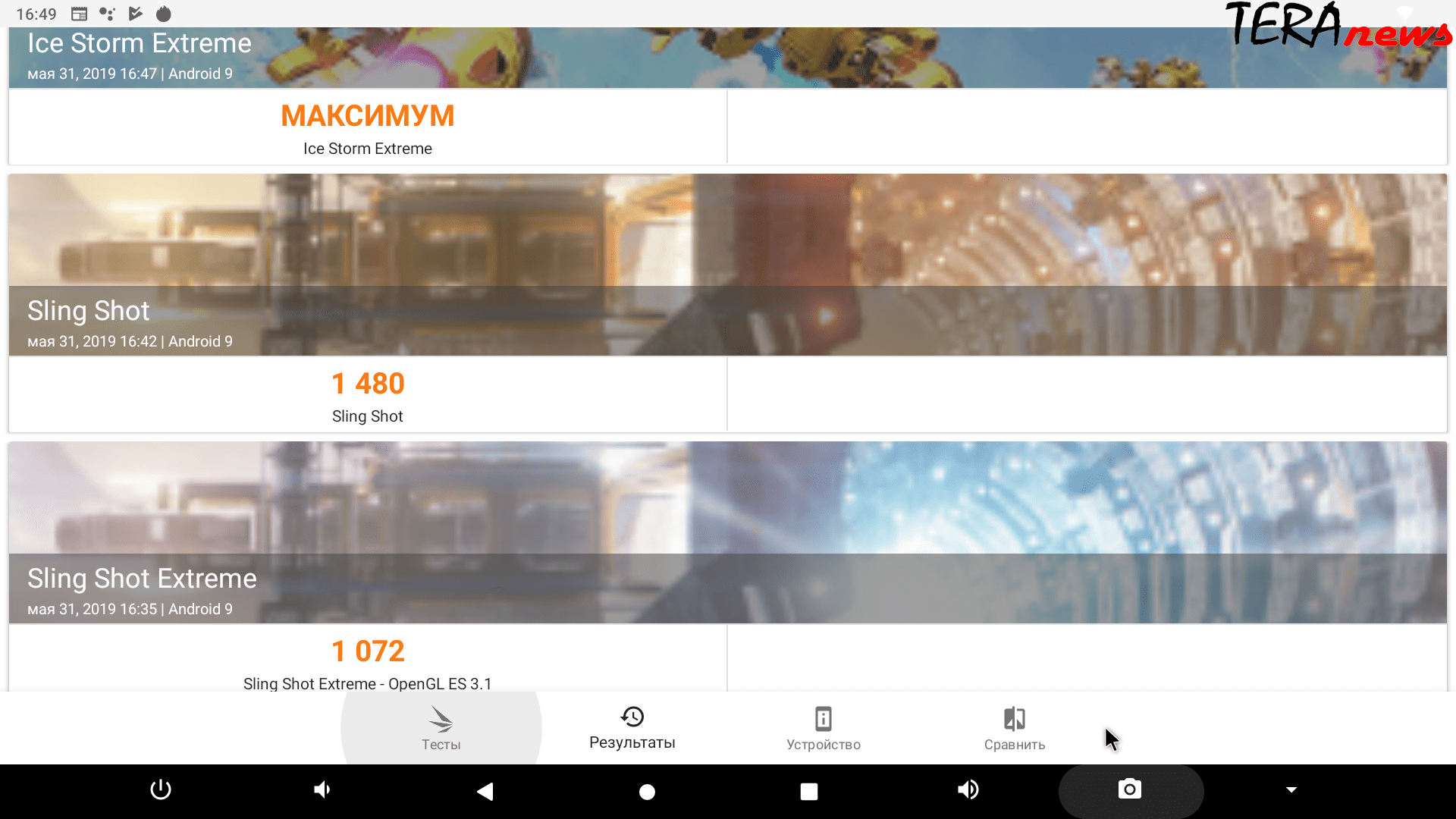
It should be noted that no other Android TV Box has such scores; this is truly a new flagship of Android consoles.
Heating and throttling
In stress mode, the temperature remained at around 73 degrees, and throttling during prolonged load was 13%
We want to note that if primitive cooling systems such as a stand with a fan or a large 120mm cooler are used, throttling completely disappears, and the temperature stays at 69-71 degrees.
Also, during normal video playback, there is no throttling, as the CPU load does not reach critical levels across all cores simultaneously. Regarding gaming, throttling is present but not immediately noticeable; the processor is powerful enough, and even with reduced clock speeds, overall performance remains unaffected.
Network interfaces
Wired connection issues are not observed; the declared speed of 1 Gbit/s is accurate.
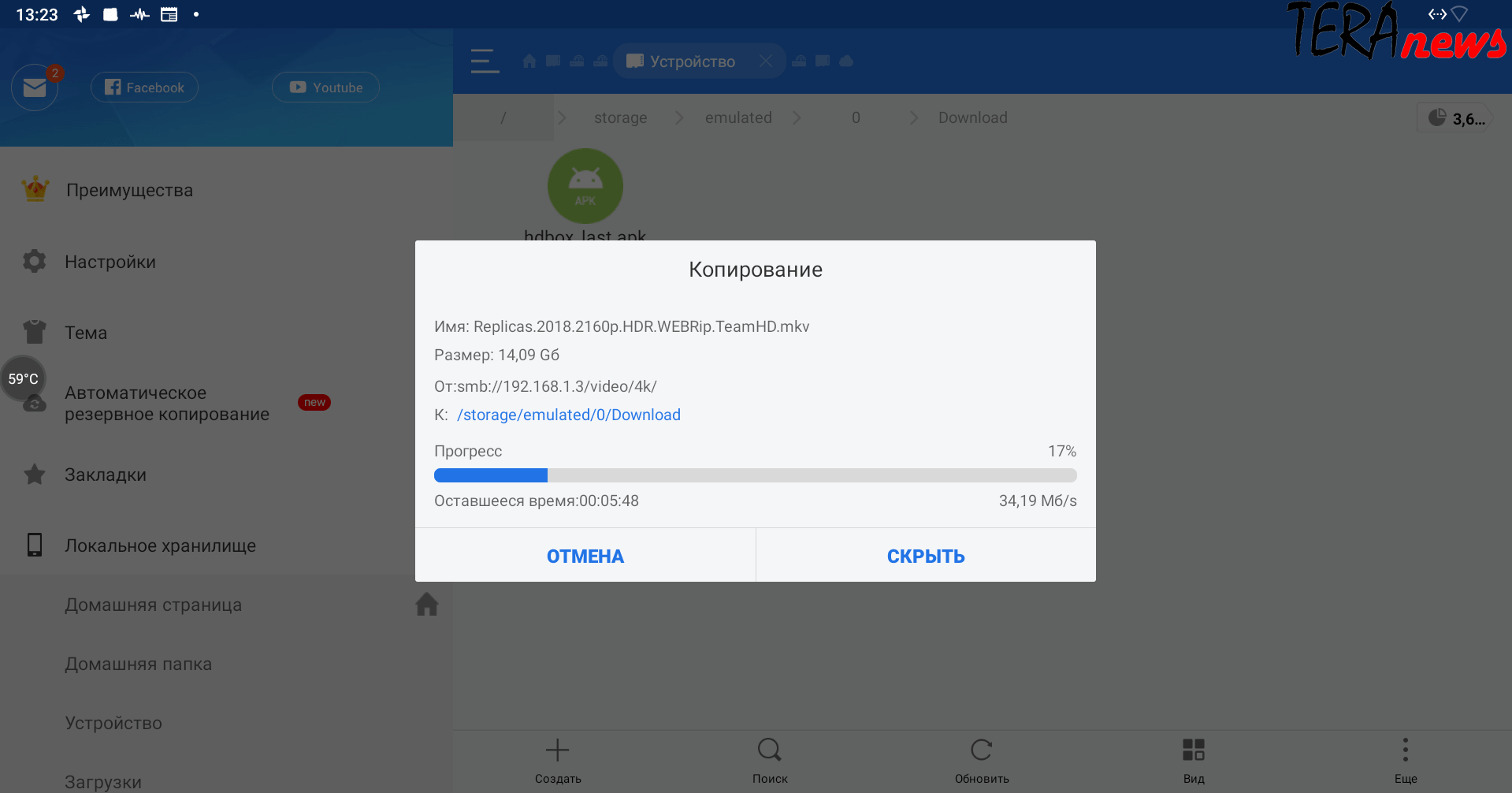
Wi-Fi connection has certain limitations: at 2.4 GHz, speeds fluctuate around 70-100 Mbit, while at 5 GHz, speeds stay around 300 Mbit.
Video playback
The main purpose of this device is to play videos from any source. During testing, apps like Kidi and MX Player were used. The video storage was a Synology DS718+ NAS. The videos included various formats (4K, 1080p) and sizes from 10GB to 100GB.
Local video playback works perfectly thanks to the top-tier Amlogic S922X processor; there are no lags or stuttering, and all formats play smoothly with instant seeking.
Playing videos over a wired connection showed no issues.
Wi-Fi testing revealed that at 2.4 GHz, files up to 30 GB played normally, but seeking had large delays. At 5.8 GHz, no issues with smooth playback were observed, though seeking delays were longer than with a wired connection.
For full comfort, wired connection is recommended.
An important note: despite manufacturer claims that the console does not support Dolby TrueHD, DTS, Dolby Atmos codecs, we tested audio passthrough on a NAD M17 receiver via HDMI and SPDIF. Support was not available, but the codecs are present in the device firmware, so future updates may fix this. We will update the review with news and test results.
Gaming
This console can be considered gaming-capable; even very demanding games run well. During testing, the following games were played:
- PUBG Mobile
- Real Racing 3
- World of Tanks Blitz
No issues were observed; gameplay was smooth without freezes, and no throttling was noticed during a 1-hour gaming session, with the device heating up only to 65 degrees.
Conclusions
This is the first console on the market with the new top-tier Amlogic S922X processor, and it has some flaws. Beelink is expected to release firmware updates soon that will expand functionality and fix bugs. For now, here are the pros and cons:
Pros:
- Fastest processor available today
- Supports all existing video formats and codecs
- Can be used as a gaming console
- Customizable interface with launcher changes and additional apps from Google Play
- Two USB 3.0 ports
- Supports 5 GHz Wi-Fi
Cons:
- Price. Our review unit cost $119; current price is $109.99, which may decrease further. In our opinion, the price is a bit high; it should be around $100.
- Heating and throttling. Although observed only during stress tests, they can occur with demanding applications.
- Low Wi-Fi speeds. Despite router claims of 500 Mbit/s to 1.2 Gbit/s, the tested speeds are unsatisfactory, though they do not hinder video playback or gaming.
- Lack of support for Dolby TrueHD, DTS, Dolby Atmos (expected to be fixed soon)
Overall, we liked the console very much; it is a true flagship, but only time will tell how long it remains relevant. We recommend it, especially since there are no competitors at the moment.
Additional
This section will publish additional materials and test results for the Beelink GT-King.
HDMI-CEC
After a week of use, the HDMI CEC control feature stopped working. The cause was identified: the included HDMI cable does not support HDMI CEC. To use this feature, you need to buy a separate HDMI cable of at least version 1.4, preferably version 2.0.
Over-the-air update
On June 17, 2019, the first firmware update for the Beelink GT-King became available, version 20190614-1907. It optimized the system and fixed some bugs. We are currently testing it and will report the results separately.



![[Exclusive] Noise Master Series: Review of flagship headphones](https://teranews.net/wp-content/uploads/2025/09/frame_19522-360x220.webp "[Exclusive] Noise Master Series: Review of flagship headphones")