Internet users, both beginners and professionals, prefer to use the fastest and most convenient browser, Google Chrome. Yes, it is fast and has no issues with intelligent search. But there are problems with image support. Downloading photos, viewing their specifications, and finding the location of the original file on the site can be challenging. Let’s briefly understand how to download a photo from a website and obtain full technical details about the file.
Let’s immediately dismiss plugins — browser extensions offered by third-party developers. The reason is simple — there is no single plugin that can solve the task comprehensively. Installing multiple extensions and then trying to get information from each is a long and painstaking process. Why waste time when there is a simple, free, and convenient solution.
How to Download a Photo from a Website
Mozilla Firefox browser solves the problem. Just install the application from the official website and get a ready-to-use and convenient tool. By the way, this is the only browser that provides complete information about the site without any extensions. Even on pages with protected content. Mozilla honestly displays the necessary data.
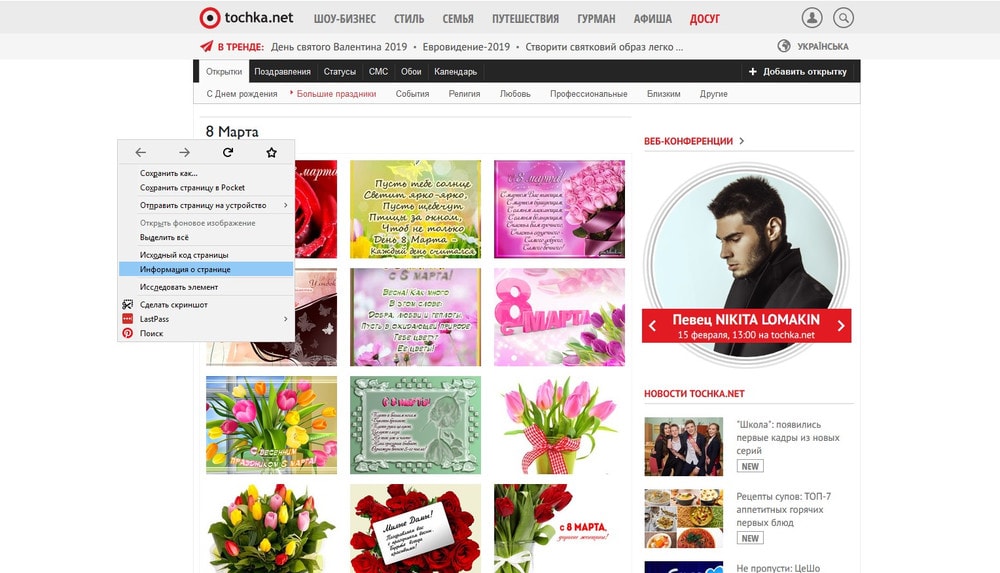
After installing the browser and visiting the site, the user simply needs to click the “Tools” button on the taskbar and select the “Page Information” menu. You can repeat this focus by right-clicking on the page itself (on a blank field).
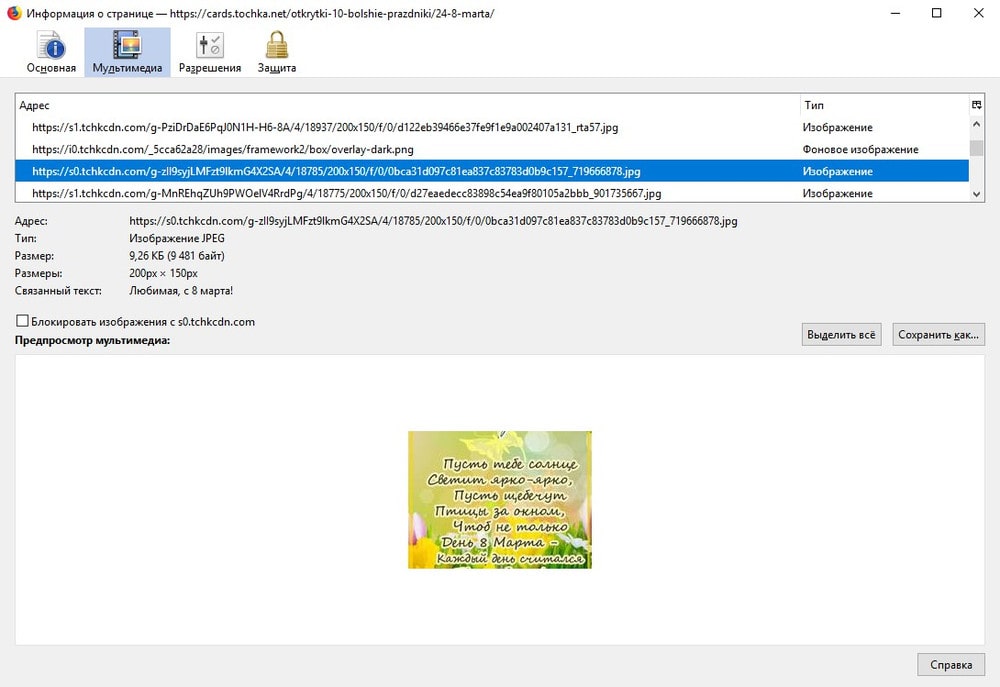
In the menu that appears, there are tabs “Main”, “Media”, “Permissions”, and “Protection”. The second section is of particular interest. By sorting files by type, you can easily find the desired photo and see all its information. Here, you can also save the selected file to your computer.
Who Needs This
Primarily developers and site administrators. To see in what resolution the image is displayed and to adjust the file, optimizing its size and weight. To find out where the photo is stored on the server and locate it by name in the site’s admin panel. To download an interesting photo from another site, selecting the required size.
Home users will also find the simple Mozilla solution useful. To find a picture for greetings and download it to their PC. There are many variations. The main thing is that everything is easy, free, and quick.



![[Exclusive] Noise Master Series: Review of flagship headphones](https://teranews.net/wp-content/uploads/2025/09/frame_19522-360x220.webp "[Exclusive] Noise Master Series: Review of flagship headphones")